
🌐 Overview
-
Customers – represent corporate clients(business/individual) with linked financial accounts.
-
Products – clinic exclusive items or services configured for billing, each tied to the correct revenue and inventory ledgers.
-
Invoices – financial documents specifically created for clinic exclusive in-house products, services, or packages and billed to customers/partners.
All three areas are interconnected: invoices are generated for customers based on products/services, and all postings flow into the Chart of Accounts (CoA).
🧭 Navigation
-
Customers: Main Menu → Accounting → Customers
-
Products: Control Panel → Finances → Products
-
Invoices: Main Menu → Accounting → Invoices
⚙️ How to Configure
👥 Customers
-
Add a new customer (patient, corporate, or insurer).
-
Assign them a Customer Ledger in the Chart of Accounts.
-
Store details like contact info, tax details (e.g., TRN for VAT countries), and payment terms.
-
Customers are referenced in invoices, payments, and reports.
📦 Products
- Path: Control Panel → Finances → Products → (+)Add Product
- Select Branch(es) or all branches
- Choose Type: Good or Service
- Enter Product name, units and price per unit
-
Products may include clinical services, consumables, or retail items.
-
Each product must be linked to:
-
Revenue Ledger (e.g., Consultation Revenue).
-
Tax Group (if VAT/GST applicable).
-
- (Optional) Enable Service Charges for this item (see next section).
- (Optional) Turn on Tax Included in Rate if tax should be included in the price; otherwise leave it off.
- Add a Description (free-text).
- Click Submit. Repeat to add more products.
- The list works as a report: Search as you type (top-right), Export to Excel and Print PDF (top-left).
Service Charges
To associate charges applicable for service addition as a product.
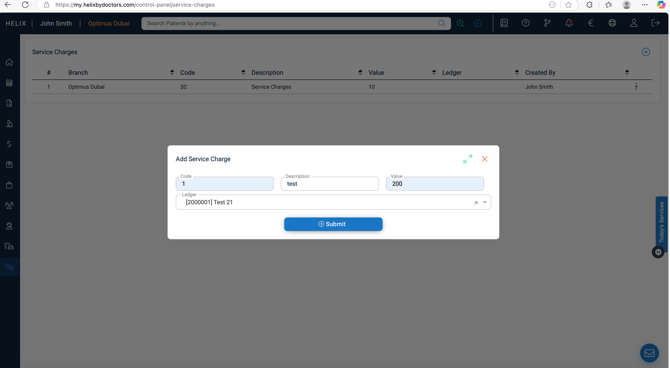
- Path: Control Panel → Finances → Service Charges.
- Click + (top-right).
- Enter Code (internal), Description, and Value.
- Link the appropriate Ledger (must already exist in the Chart of Accounts).
- Click Submit. Repeat to add more.
- The list works as a report: Search as you type (top-right), Export to Excel and Print PDF (top-left).
🧾 Invoices
-
Used whenever a clinic exclusive product/service is billed to a corporate customer.
Creation of New Invoice
- Choose your customer from the drop-down list or optionally click on the plus button to add a new one.
- Select the cost center, if applicable.
- Enter a title for the invoice and the order number.
- Choose the date, enter the terms and the due date of the invoice.
- Add items by picking them from the drop down list, each item on separate row.
- Optionally, you can add a product on the fly by clicking on the plus button in the ‘item field’.
- Enter the quantity.
- Add some notes if you would like and Submit.
-
Row actions allow:
-
Edit
-
Cancel Invoice
-
Create Credit Note (preferred for adjustments/refunds)
-
Print Invoice
-
Key rules:
-
Every invoice must be tied to a Customer and Product/Service.
-
All invoices post automatically to ledgers if automation is enabled, or require manual JV posting if automation is OFF.
📊 Management
-
Keep customer details updated, especially ledger linkages and tax numbers.
-
Review product setups to ensure correct ledger mapping and avoid revenue misclassification.
-
Regularly reconcile invoices with payments received to maintain accurate accounts receivable.
-
Use reports to track outstanding invoices, cancelled invoices, and credit notes.
💡 Pro Tips
-
Always prefer issuing a Credit Note over cancelling an invoice for better audit trail.
-
Create separate ledgers for corporate/insurance customers vs. cash patients.
-
Group related products under packages to simplify billing and improve reporting.
-
Use invoice reports to monitor trends by doctor, department, or service.
-
For compliance in VAT/GST regions, ensure invoices always reference the correct Tax Group and customer TRN.