
🌐 Overview
The Loyalty Program helps your clinic build patient loyalty and encourage repeat visits by offering automated spending rewards.
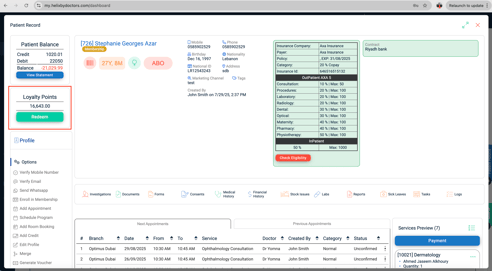
With this feature, you can:
-
Automatically convert spending into loyalty points.
-
Exclude selected service types or specific services from earning points.
-
Convert earned points into patient credits for future use.
Once active, Helix automatically handles all point calculations and credit conversions—no manual work required.
🧭 Navigation
Path: Control Panel → Patient Billing → Loyalty Programs
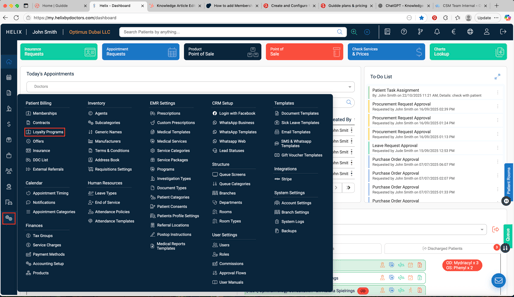
🧭 Step 1: Create a Loyalty Program
-
Click ➕ Add (top-right corner).
-
Fill in the program details:
-
Program Name – Give the program a clear and descriptive name (e.g., Helix Rewards 2025).
-
Exclude Service Types / Specific Services (optional) – Multi-select any services or service types that should not generate loyalty points.
-
Conversion Factor – Define how points are calculated based on patient spending.
-
Example: If every AED 100 spent earns 1 point, set the conversion factor to 0.01.
-
-
-
Click ✅ Submit to save.
-
The program becomes active immediately and begins tracking points on all eligible invoices.
-
⚙️ Step 2: How Loyalty Points Are Earned
-
When an invoice is created and paid, Helix automatically calculates the loyalty points based on your conversion factor.
-
Excluded services or service types do not generate loyalty points.
-
Points accumulate automatically in the patient’s file as they continue to spend.
-
Once converted, these points appear as credits that can be used to pay for future invoices.
📊 Example of Loyalty Calculation
| 💵 Patient Spend (AED) | ⚙️ Conversion Factor | 🎯 Points Earned |
|---|---|---|
| 100 AED | 0.01 | 1 Point |
| 500 AED | 0.01 | 5 Points |
| 1000 AED | 0.01 | 10 Points |
📂 Step 3: Viewing & Redeeming Loyalty Points
-
Once loyalty points convert to credits, they are visible in the patient’s record.
-
Navigate to Patient File → Financial History → Credits to view them.
-
These credits can be directly applied to invoices during billing.
-
All loyalty conversions and applications are automated by Helix—no manual input required.
🧩 Step 4: Managing Loyalty Programs
-
Only one loyalty program can be active at any given time.
-
To adjust the conversion rate or excluded services, open and edit the existing program.
-
To replace it with a new one, disable or delete the old program first.
-
Excluded services will always remain outside the loyalty calculation, even if billed.