
Audience: Nurses
Purpose: Guide nurses through locating, completing, and reviewing dedicated nursing assessment forms within the screening workflow.
When to Use This Feature
These forms are part of the patient screening process and should be completed where clinically relevant.
They are stored in the patient’s EMR and can be edited or deleted later if required.
Accessing the Nurse Forms
-
Log into Helix with your nurse credentials
-
Open the Screening page for the patient
-
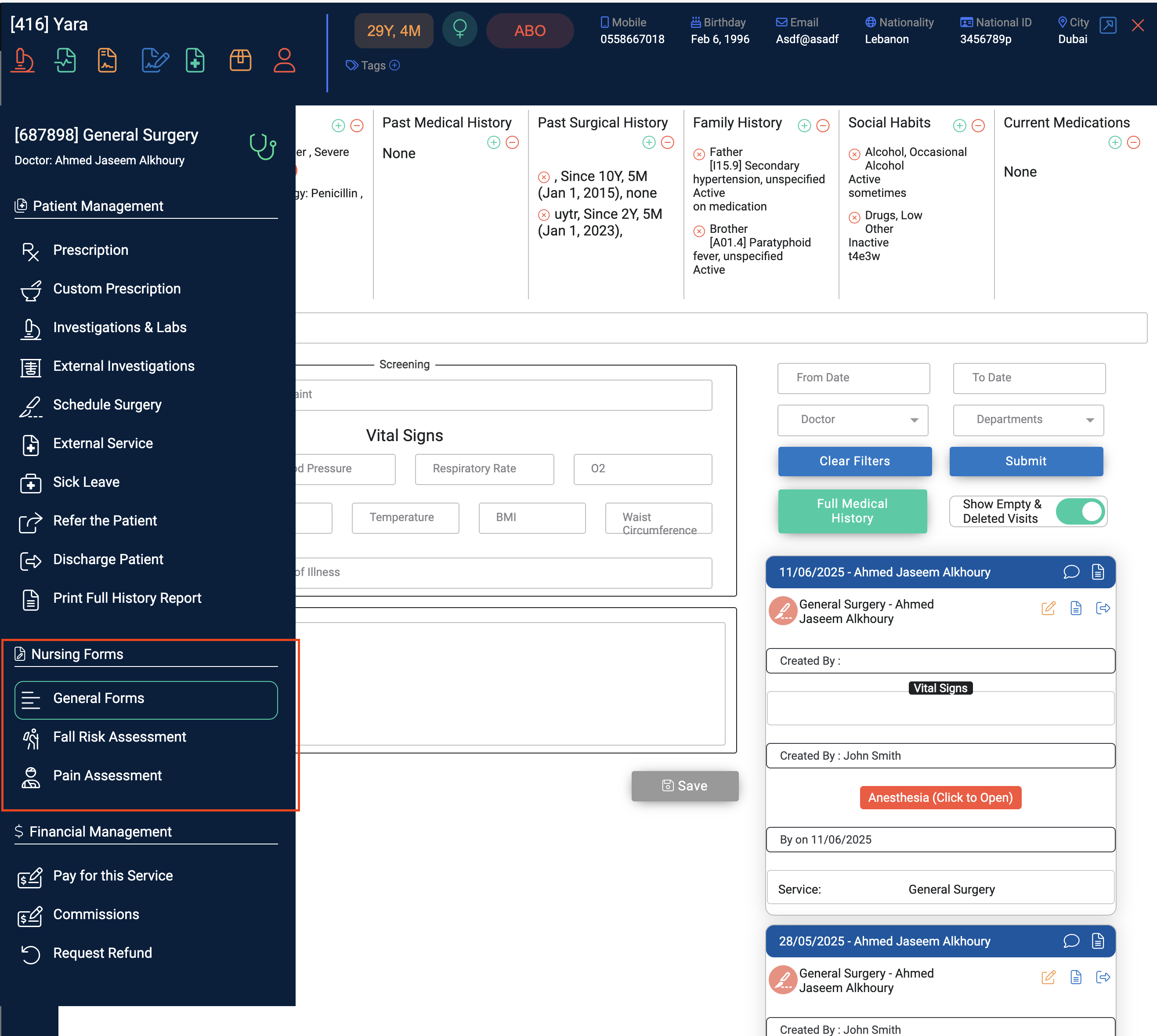
On the left panel, under Patient Management, scroll to the Nursing Forms section
-
You will see a list of available forms, including:
-
General Nursing Forms
-
Fall Risk Assessment
-
Pain Assessment
-
Completing and Managing the Forms
-
Select the required form and fill in all relevant fields
-
Click Save once completed
-
After saving, the form will appear on the right side of the screening page
You can then:
-
Edit the form by opening it again and making changes
-
Delete the form if entered in error
Important Notes
-
Saved nursing forms are part of the patient’s medical record
-
They can be viewed by doctors and other authorised users as part of the visit summary
-
Fall Risk and Pain Assessments should be completed based on your clinic’s protocol or if clinically indicated