
Audience: Nurses
Purpose: Guide nurses on how to locate and review today’s booked appointments and admitted patients.
Access Requirements
-
Valid nurse login credentials
-
Proper role-based permissions in Helix
-
Access to the Today’s Appointments and Today’s Admissions panels on the home screen
Locating Today's Appointments
-
Log into Helix using your nurse credentials
-
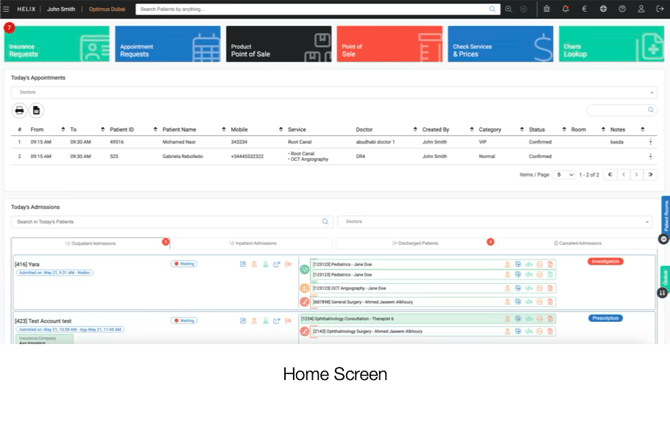
Upon logging in, your home screen will display a panel labelled “Today’s Appointments”
-
This list shows all appointments scheduled for the current day, including:
-
Patient name and contact information
-
Appointment time
-
Assigned doctor
-
Services to be provided
-
Status (confirmed, cancelled, completed, etc.)
-
Viewing Today’s Admissions
-
On the same home screen, locate the “Today’s Admissions” section
-
This panel lists all patients who are currently admitted to the clinic
-
Details shown include:
-
Patient name and ID
-
Current status (e.g., waiting, screening, in service)
-
Assigned doctor
-
Linked service(s)
-
Navigating Between the Two Sections
You can scroll or toggle between the two panels directly on the home screen.
These views are refreshed in real time based on patient activity in the system.
Key Reminders
-
Appointments reflect scheduled activity for the day
-
Admissions reflect live clinic activity as patients check in
-
These panels are the nurse’s primary dashboard for managing the daily patient flow