
Audience: Doctors treating patients with different spoken languages
Purpose: Allow spoken communication to be translated to English during the consultation.
Steps to Use Verto Translation
-
Login as a Doctor
-
Open a Patient Record
-
Select an admitted patient and click “Open Medical Record”.
-
-
Open Verto Translation
-
Ensure the Verto icon appears in the chart.
-
Click the icon to open the floating window.

-
-
Activate Translation Mode
-
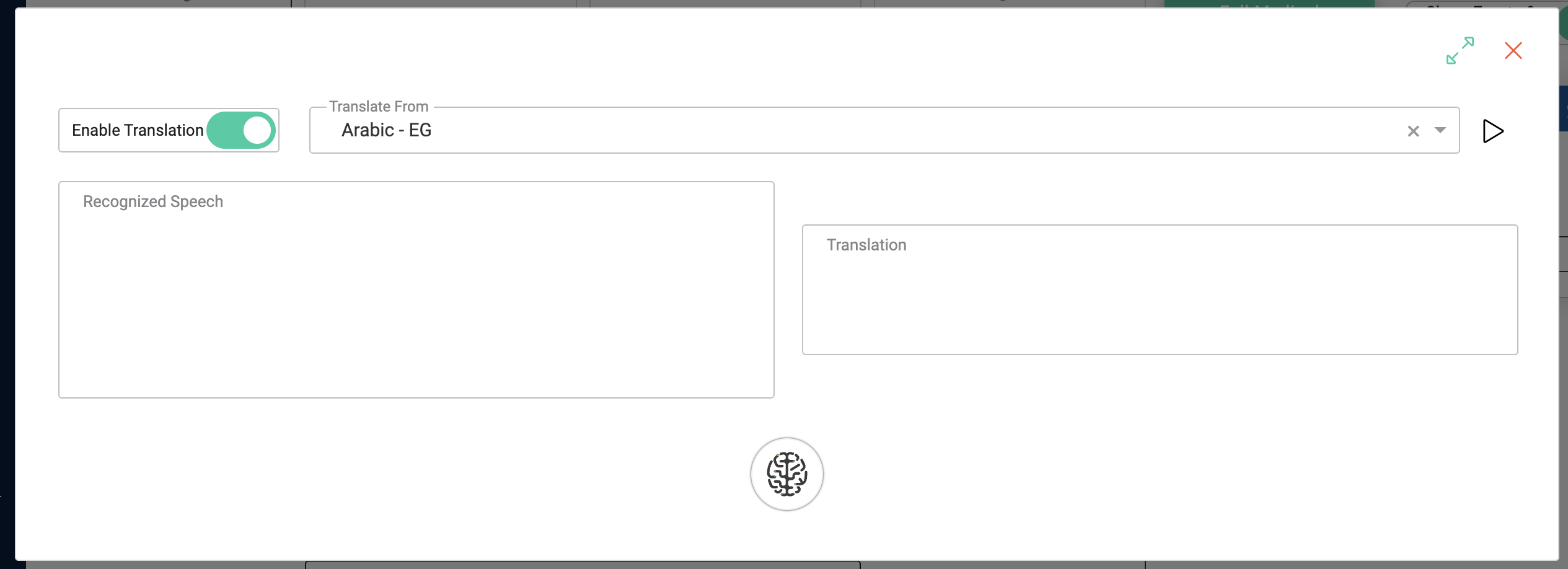
Toggle the switch at the top-left of the floating window to enable translation.
-
The interface will split into:
-
Recognised Speech
-
Translated Text
-
-
-
Select a Language
-
Use the dropdown menu to choose the language you will speak.
-
Click the Play button.
-
-
Begin Speaking
-
Talk in the selected language.
-
Verto will capture your speech and display real-time translation in English.
-
-
Doctor–Patient Communication
-
If the doctor and patient speak different languages, each may speak in turn.
-
Verto will translate both directions into English.
-