
Today’s Admissions & Patient Flow Overview
In Today’s Admissions, the patient panel displays the patient’s file number, name, and admission time. If the visit was booked, it also shows the Original Booking Time; if not, the visit is clearly marked as a Walk-in. This panel also indicates any external referral linked to the patient, along with their insurance company or contract name.
After the patient is admitted, they should be sent to Screening with the nurse by clicking the orange Send to Nurse button. Once the nurse completes screening, the patient remains in Today’s Admissions and their status updates to Screening.
The next step is to send the patient to the doctor. On the patient’s row, click Send to Doctor. The status then updates from Screening → In Service, progressing the encounter and making the visit available for the doctor to begin consultation.
Once the appointment is completed, you can discharge the patient. This ensures the encounter is properly closed, prevents the patient from appearing as still inside the clinic, and meets NABIDH requirements.
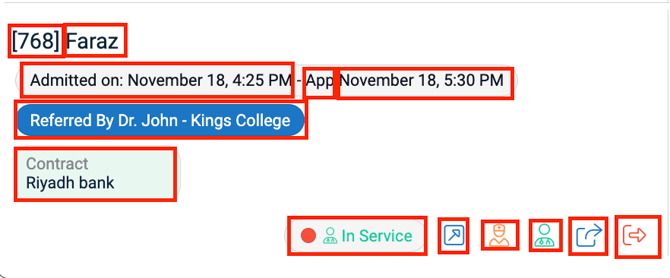
To begin examining the patient, open the medical chart by clicking the Open Medical Chart blue button in the service panel. The medical chart will then open on top of the Home screen.
The green sign button enables patients to complete consent forms directly on the screen or using an iPad.

Chart viewing options
To pop the medical record out into a new tab → Click the blue “open in new tab” button (top-right). To Return to Home screen → Click the red X Close button.

Summary of patient Flow
| Stage | Action | Handled By |
|---|---|---|
| Screening | Nurse enters vitals & history | Nurse |
| Send to Doctor | Patient becomes In Service | Reception/Nurse |
| Medical Chart | Doctor completes clinical documentation | Doctor |
| Discharge | Patient is marked as out of facility | Reception/ Cashier |